
Running daemontools services
The following assumptions and guidelines hold for the original daemontools, daemontoolsx, daemontools-encore, and to some extend runit - unless where noted explicitely.
Most of the following ideas ware laid out in my book Powernetworking mit Qmail & Co. written in 2002; but never published. This page is an english excerpt from chapter five accompanied by current material.
Note: I use the name service and daemon here. Those refer to the same process in their given environment. In general, a service is a daemon running under supervise control.
Integrating daemontools into your Unix system
The default installation of daemontoolsx tries to detect, whether your system is *BSD-like or a System V variant (like Linux or OmniOS).
- System V (/etc/inittab): The following line is added here
SV:123456:respawn:/command/svscanboot
- *BSD (/rc.local): Including the command
csh -cf '/command/svscanboot &'
- For Linux systems based on systemd: Apply the following unit-file to your start-up configuation
[Unit] Description=Daemontools After=sysinit.target [Service] ExecStart=/usr/local/bin/svscanboot Restart=always [Install] WantedBy=multi-user.target
Note, that in the initial daemontools the directory /command as well as /service are already fixed. With daemontoolsx those requirements are relaxed.
Let's have a look into the un-processed svscanboot I ship with daemontoolsx:
Here, SERVICE and HOME are substitued during installation with the first line of conf-service
and conf-home respectively. It is possible, however, to simultaneously run serveral copies of that script with different service paths.
Simply copy it with a new name, e.g. svscanboot.var, change the path in here, eg. /service => /var/service,
and include it into your system's boot sequence. Done!
For compatibility with daemontools, the /command directory shall be used even with daemontoolsx.
The /service directory
As shown above, svscanboot is typically called for scanning a single directory by means of svscan given /service. But in general, invoking of svscanboot serveral times at start with different directories can be used to diffferentiate certain services. Given the above systemd unit file, the parameters can be adjusted such, that even different Linux cgroups can be achieved. Say: One for mail services and the other for DNS. Those can be setup with distinguish /service-XX directories.
We remember that svscanboot is just a script which can be customized and not a paradigm. We consider this as imperative customization, unlike systemd's declarative approach.
Setting up a service: run scripts
The magic for run scripts includes the following paramaters to supply:
- Given envuidgid each service runs in its own chrooted environment: It is already jailed. Therefore, every daemon requires a Unix user, a group, a home directory, and finally a shell to execute. The shell is typically, none-interactive: /bin/nologin or whatever is used on your Unix system.
- The daemon can be rescricted given the system resources: softlimit. Such as memory and the number of open file descriptors which can be limited on call.
- The daemon needs parameters: Those are given on the command line.
Thats it! The daemontools provide all of this. At that point, I never understood the necessity for jails, zones, or even Docker images. Para-virtualization is already provided here!
Gerrit Pape was gentil enough to provide a set of daemontools run scripts:
Those might be modified to your own needs!
Signaling services
A daemontools daemon can be controlled by means of svc.
| svc call | Signal | Meaning & consequences |
|---|---|---|
| svc -u | Up | Starts the daemon; in case it abends will be re-started. | svc -d | Down | Shuts down a running daemon process by means of the TERM signal. |
| svc -o | Once | Starts the daemon. In case it ends/abends will not be restarted. |
| svc -p | Pause | Sends the signal STOP to the daemon. |
| svc -c | Continue | Sends the signal CONTINUE to the daemon. |
| svc -h | Hangup | Sends the HUP signal to the daemon; often used for re-reading the config files. |
| svc -a | Alarm | Sends the ALRM signal to the process, typically honored by terminating running subprocesses. |
| svc -i | Interrupt | The signal INT is send to the process. |
| svc -t | | The signal TERM is send to the process. |
| svc -k | Kill | The KILL signal is end to the process. |
| svc -x | Exit | supervise will stop supervising this service, once the process is terminated or ended. |
Note: svc ist able to send signals to a collection of daemon services by means of wildcards:
- svc -u /service/*
- svc -d /service/*/log
Chrooting a service
One important concept running a daemon - and this has been learned from sendmail and its early security breaches - never to run it under the root user. Rather, a serice is always attached (and confined) to a real Unix user. This typically happens, after the service has given given permissions to bind to a priviledged port for invocation.
To enforce this behavior is matter of setuidgid. Thus prior of setting up a services, one should consider:
- What is the corresponding Unix user and it uid?
- What is the respective group (gid) the user belongs to?
- What is its home directory and its shell?
- How and where to perform the logging of this service and under what Unix account is this realized?
A well-behaving service - and in particular if the service does not allow access to the filesystem outside its home directory - is a first-class citizen and does not require additional compartmentization.
Limiting a service
A daemon eats up system resources after its start:
- It requires memory for his executable.
- It needs memory to store data, which might be allocated dynamically and on demand.
- It facilitate file descriptors for intercommunication in particular with the file system.
The last two points are critical and may impact your Unix system's behavior. Given the Unix user - as discussed above - limits do exist, like for instance provided by umask but a more refined control of resources is available by means of softlimit.
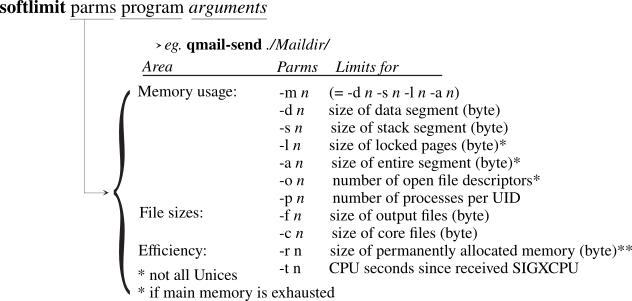
Attention: A daemon hitting those limits will be kicked-out. Thus, the process will be automatically terminated and afterwards restarted by means of superivse. Invoking those limits requires a careful monitoring.
Feeding a service with environment variables
An interactive Unix user session is fed with a large set of environment variables. This can easly be check on a terminal calling env. One of the most relevant is the environment variable $PATH allowing easy access to the execubles. Further $LD_LIBRARY_PATH is important for the dynamic binding. In addition, locale enables us to check the localization of our terminal.
For daemons we need to control those settings, potentially clean up unwanted ones, and just set and use the ones relevant for our daemon process. Clean up is done by feeding env with a 'dash': env - what we see often in (run) scripts.
Setting of environment variables - thus that child processes are provided with the same variable - depends on the shell and often export is used here. In Unix, additionally another mechanism is used: sourcing. In this case, a file is 'executed' and its content has been made available as (exported) environment variables. This, of course, only makes sense for a 'single-liner' file.
In daemontools this mechanism has been cultivated and and extended:
- envuidgid enhances the setuidgid faclity to proliferate the given envrionment variables for the user.
- envdir follows the idea of sourcing, but now uses a directory typically called env as carrier of files to be subject of sourcing. This not only provides transparancy for a give service while mirroring environment variables in the file system, but by the same token makes them persitent and easily recognizable.
It should be noted, that - unlike other conventions in Unix - environment variables are typically given in CAPITAL letters only!
Services in the background
In our today's understanding a daemon in the foreground to enable controlling while listing to signals. Rather, some older daemons detach themself from the controlling terminal while working in the background. This is matter of job control of the Unix shell.
Within daemontools fghack can be used to enable those deteaching processes to be managed by some extend by supervise.
Program groups and cgroups
One advantage of Linux against legacy Unix systems is the introduction of control groups (cgroups) as additional process attribute in the kernel. Rather, for all Unices, we can employ the idea of a program group.
Daemons, running under supervise inherit the same program group upon start. For monitoring tools like Prometheus allowing fine-grained process analysis, it might be helpful to organize a set of programs to run in a dedicated cgroup.
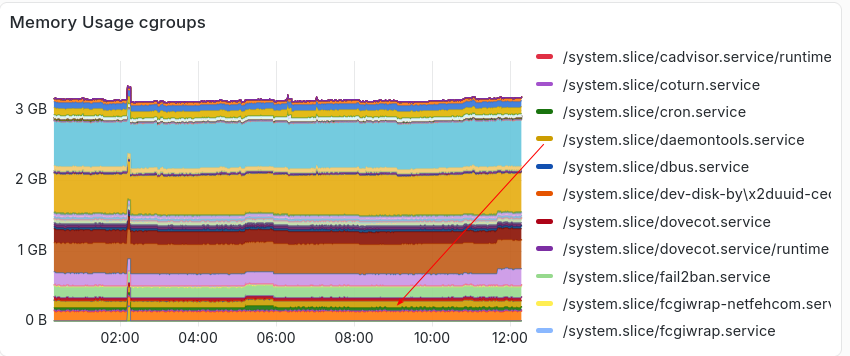
In legacy Unix the concept of process group exist, at least allowing to send signals to a particular group of services. Within daemontools one can achive separated groups for services by means of pgrphack.
Service dependencies
One merit of supervise is closely related to the fact, that is a filesystem-based: supervise scans the /service directory in ASCII alphabetic order. Thus daemons start with a capital letter A-Z are followed by those one with small letters: a-z.
In daemontoolsx supervise has been enhanced allowing to define a trigger. Two distinct trigger files are examined:
- PATH/<daemon>/supervise/status
- PATH/<daemon>.pid
The first case is in-bailiwick where one daemontools service depends on one other. The second case can be considered out-of-bailiwick. Here, a traditional Unix pid-file is read and considered as trigger. In both cases, the read pid of the depending process is tested by means of a signal.
Monitoring a service
Ideally, a daemon does not need a particular monitoring since it does not fail. And if it fails, supervise will restart the process, though without given a diagnosis to the problem. The only failure which might be acceptable to some extend is resource shortage like in particular memory, which could be exhausted.
daemontools provides two means for the superuser, to test a daemon under supervise:
- svok: is the service under management control; thus does PATH/<daemon>/supervise/ok exist (liveliness)?
- svstat: what is the state of service and since when as binary reported in PATH/<daemon>/supervise/status.
Here is a sample for the program minidlnad running under control of fghack and some other programs including those 'downed':
As we can see, all services start simultaneously, though they are raised (if forseen) one-after-the other in alphabetic order.
readproctitle
readproctitle is actually setup by svscanboot. It catches errors bringing up supervise's services.
The interface to readproctitle is just ps. Unfortunately, ps is different on each OS, therefor its capabilities are mentiond here as [depend]. In order to read the entire line, ps should be invoked for long-line support and the superuser to read the output. Here is an example; errors given on one line only:
Note: svcan reads directories under /service/ every five seconds, thus the error is repeating.
readproctitle errors as fetched by ps -[depend] | grep readproctitle are 'sticky'. Thus the error shows still up, even if recovered from it. However, there is a trick to 'clear' the status line:
- Set up a new service, lets call it clear.
- Generate a run script (chmod +x) for this service with the following content:
#!/bin/sh yes '' | head -4000 | tr '\n' .
- Generate a 'down' file for this service.
- In case, you need to clear the readproctitle line, simply svc this service 'once'.
Operating supervise and caring about abends of daemons
Some operational notes shall be added here:
- It is extremly useful not to generate a daemontools service initial under e.g. /service. Rather, prepare a local directory outside /service with the forseen name of the service and setup your run script here. Test the run script locally! Touch down!
- Once verified, that the run script is working correctly (given its output on the console), link this directory to /service, since supervise will scan this directory immediately resulting eventually in errors displayed by readproctitle.
- Daemons may abend under several conditions. However in any case, supervise will restart the service irrespectively of the root cause. In case the service generates a core file a lot of those will be created in short time. Take care of your file space for the core dumps. You might restrict the core dump size using softlimit.
Logging services with multilog
daemontools multilog is a strong strategic basis for the following use cases:
- Alarming: provide initial excerpts for instantaneous reactions.
- Logfile management: keep your logfiles in size and in scope.
- Archiving: potentially use condensed logfile information for later, eg. post-mortem analysis or regulatory requirements.
RFC 5424 describes the so-called syslog format, but is not very welcome for every situation. It is by no-way clear, what a daemon should write to the logfile. Another obstacle is the timestamp format and interpretation, which will be discussed later.
| Set | Qualifier | Parameter | Example | Result |
|---|---|---|---|---|
| Timstamp | t | prepends each log line with a TAI64N timestamp | ||
| Timstamp | T | prepends each log line with an accustamp timestamp | ||
| Selection | - | pattern | -*status* | deselects a logline given this pattern |
| Selection | + | pattern | +*Invalid* | selects a logline given this pattern |
| Extract | = | file name | =./log/status | writes selected logline to file |
| Extract | e | writes first 200 byte of selected logling to STDERR | ||
| Logfile | s | size (byte) | s16777215 | maximum size of logfile before rotating |
| Logfile | n | number | n20 | number of backup logfiles to keep |
| Logfile | ! | Post processor | !postprocessor | feeds logfile current to the provided postprocessor |
| Logfile | . (or) / | directory | ./dir | writes selected logline into the file current at ./dir |
The accustamp option is only available for daemontools-encore and daemontoolsx.
Filtering log messages for Alarming
multilog can be used as pipline for log messages:
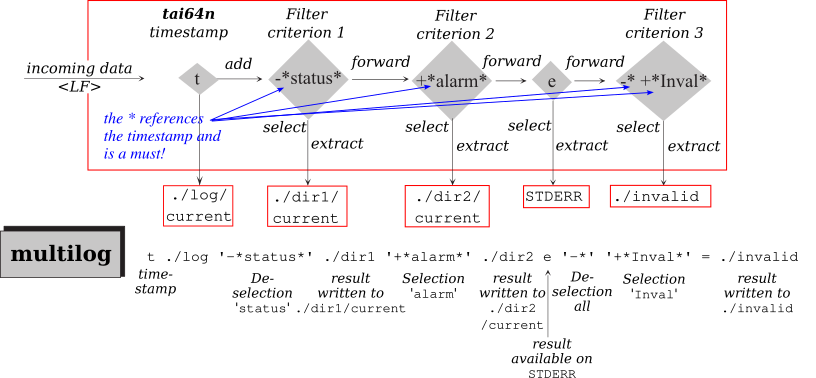
- A timestamp can be added.
- Filters can be applied to extract the result for further processing.
- Selected messages my be subject of further postprocessing.
Though multilog has to capability to report one or several alarm conditions is a file to be read by some other program, the use of a postprocessor allows to feed an alarm condition into a centeralized log managment tool, often discussed as ISMS (Information Security Management System ) as part of a SOC, a Security Operations Center. Typicall, a script is used to exfiltrate the log information provided by multilog on file descriptor 4 and forwarding - for instance by means of tcpclient or sslclient - to a central log management facility. Given the TAI64N timestamp, events here can be correlated unambiguously.
Log file management
Another strength of multilog is its ability to allow automatic or triggered logfile rotation:
- The 'current' logfile is simply called current.
- The backuped logfiles using the TAI64 timestamp as file name, appended with an '.s' if completed or '.u' else; for instance at shutdown of the Unix system: @4000000069d8e98b2e5bf544.u
In order to support logfile handling, multilog is capable to follow some signals:
- SIGUP start writing the logfile to ./current.
- SIGTERM stop writing the to logfile.
- SIGALRM finish writing ./current close and rename it with the TAI64N timestamp at that point in time. Carry on with a new ./current.
Note: An application using multilog
may stop its service, if the output buffer for logging can not be written.
To 'refresh' the run script, the sequence svc -adu for
the given log instance /service/<daemon>/log is the recommended procedure.
Timestamps
In order to correlate logfiles from different sources for a a time series or for forensic in case of on incident, it is important to have correct time stamps (per line). multilog uses a TAI64N timestamp here, which is not bound to local time or leap seconds. It is a monotonous time format and much better suited than eg. UTC including time zones and other obstacles.
daemontoolsx includes helper routines to handle TAI64N timestamps:
- tai64n prepending a line with a TAI64N timestamp.
- tai64nlocal translating a TAI64N timestamp to local time.
- tai64nfrac translating the TAI64N format to an accustamp timestamp (Unix tickmarks) including fractional seconds.